






SOP vs Checklist: Which One Does Your Business Need?
As a business grows, work becomes harder to manage consistently. A small team can rely on verbal instructions, but a growing team needs documented processes.
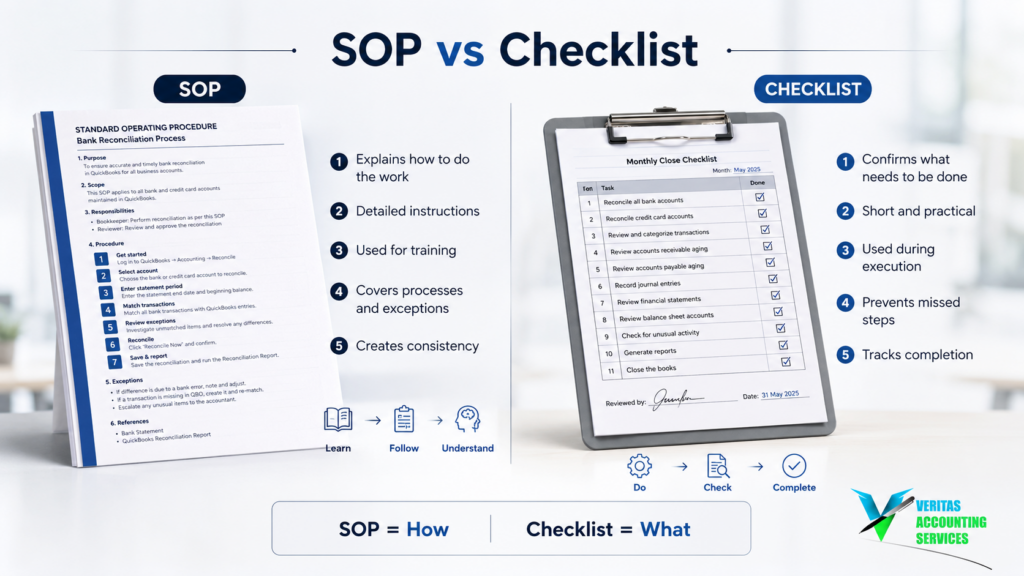
SOP vs Checklist is a useful distinction because the two tools solve different problems. An SOP explains how work should be performed. A checklist confirms that the required work was completed.
Understanding SOP vs Checklist can help your business reduce errors, train employees, and create repeatable processes.
What Is an SOP?
SOP stands for Standard Operating Procedure.
An SOP is a documented set of instructions explaining how a particular task or process should be performed.
A typical SOP may explain:
- What needs to be done
- Why the process is important
- Who is responsible
- When it should happen
- What tools are required
- What steps should be followed
- What to do when something goes wrong
- Who reviews the completed work
For example, a bookkeeping company might have an SOP for month-end accounting. It could explain how to review transactions, reconcile accounts, record adjustments, review financial statements, and complete the month-end closing process.
An SOP turns individual knowledge into a repeatable company process.
What Is a Checklist?
A checklist is a short list of actions that need to be completed.
A month-end checklist might include:
- Bank accounts reconciled
- Credit cards reconciled
- Accounts receivable reviewed
- Accounts payable reviewed
- Payroll recorded
- Financial statements reviewed
- Reports completed
A checklist does not normally explain every detail. It reminds the employee what must be done.
SOP vs Checklist: The Main Difference
The simplest way to understand SOP vs Checklist is to think about two questions.
An SOP answers:
“How should I do this?”
A checklist answers:
“What do I need to complete?”
For example, a client onboarding SOP could explain how to collect information, create the client profile, obtain software access, assign responsibilities, and complete the first review.
The related checklist could confirm:
- Agreement signed
- Client information received
- Documents received
- Software access provided
- Opening balances reviewed
- First meeting completed
That is the core SOP vs Checklist difference.
SOP vs Checklist: Quick Comparison
| SOP | Checklist |
|---|---|
| Explains how to perform a process | Confirms tasks are completed |
| Provides detailed instructions | Provides reminders |
| Useful for training | Useful for execution |
| Helps standardize procedures | Helps prevent missed steps |
| Can explain exceptions | Usually follows defined steps |
| Best for complex work | Best for repetitive work |
The right choice depends on the process.
When Should You Use an SOP?
An SOP is useful when a process is complex, important, or difficult to learn.
Create one when:
- A process has several steps
- New employees need training
- Several people perform the same task
- Important decisions are involved
- The process has exceptions
- Errors could be costly
- Only one employee knows how to perform it
Payroll, client onboarding, month-end accounting, and quality control are common examples.
In these situations, the detailed procedure provides the knowledge employees need.
When Is a Checklist Enough?
A checklist may be enough when employees already understand the process.
An office closing checklist, for example, might say:
- Lock the entrance
- Shut down equipment
- Check meeting rooms
- Secure documents
- Check windows
- Set the security system
There is little value in creating a long document for a simple task.
This is an important point in SOP vs Checklist: documentation should match the complexity of the work.
SOP vs Checklist in Accounting
Accounting is a good example of how the two tools can work together.
A month-end SOP could explain how to reconcile bank accounts, review credit cards, check receivables and payables, record adjustments, and review financial statements.
The checklist could then confirm:
- Bank reconciliation completed
- Credit card reconciliation completed
- Receivables reviewed
- Payables reviewed
- Adjustments recorded
- Financial statements reviewed
- Reports finalized
The SOP explains the method. The checklist confirms completion.
This practical combination makes the SOP vs Checklist concept easier to apply in daily operations.
SOP vs Checklist for Employee Training
If the main goal is training, an SOP is usually more useful.
A checklist can tell a new employee what tasks exist, but it may not explain how the company expects those tasks to be performed.
For example, “Complete bank reconciliation” is a checklist item. An SOP can explain where to obtain the statement, how to investigate differences, how to handle outstanding items, and who reviews the work.
Once the employee understands the procedure, the checklist can support regular execution.
SOP vs Checklist for Reducing Errors
Both tools reduce errors, but they address different causes.
An SOP helps prevent mistakes caused by not knowing the correct process.
A checklist helps prevent mistakes caused by forgetting a required step.
If an employee does not know how to process a refund, better instructions are needed. If an experienced employee knows the process but sometimes forgets to document approval, a checklist may help.
This distinction is one of the most useful parts of SOP vs Checklist.
Why Growing Businesses Need SOPs
As a company grows, founders cannot personally explain every process to every employee.
With five employees, answering questions may be manageable. With 50 employees, it becomes inefficient.
SOPs document important knowledge so employees can refer to the same process instead of repeatedly asking the founder.
They can improve training, consistency, accountability, and independence.
Why Growing Businesses Need Checklists
More employees also mean more tasks, deadlines, and opportunities to miss small steps.
A checklist provides a simple control for repetitive work such as:
- Month-end closing
- Payroll
- Client onboarding
- Employee onboarding
- Payment processing
- Bank reconciliation
- Quality control
Employees do not need to reread a long procedure every time they perform a familiar task. A checklist gives them a quick completion check.
When You Need Both
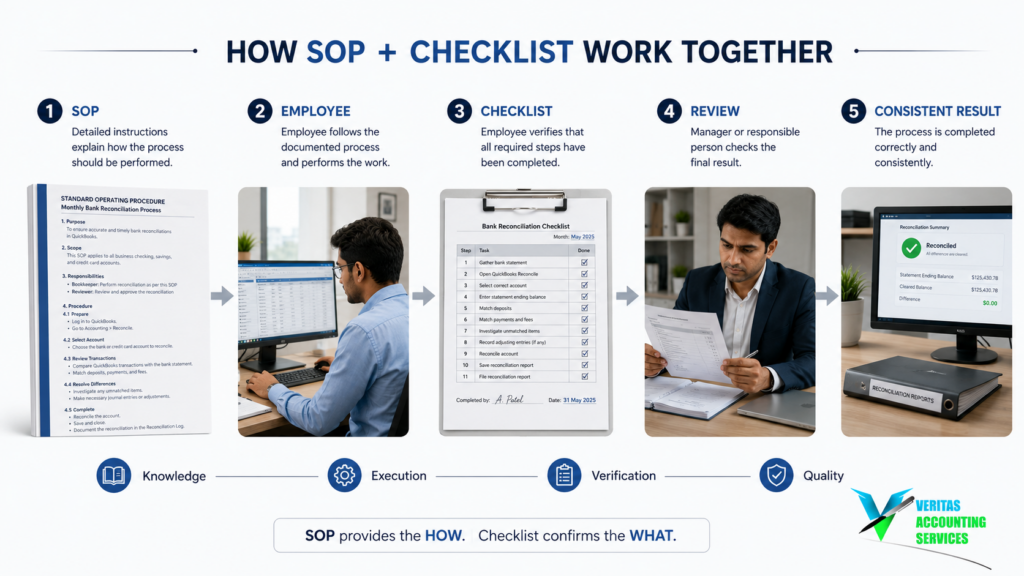
Some processes need both tools.
Consider employee onboarding. The SOP can explain how documents are collected, systems are created, access is approved, and training is completed.
The checklist can confirm:
- Employment documents received
- Payroll setup completed
- Email created
- Software access provided
- Training scheduled
- Manager assigned
The SOP provides instructions. The checklist provides execution control.
This is often the best answer when a business is deciding between SOP vs Checklist for an important recurring process.
Don’t Create an SOP for Everything
More documentation does not automatically mean better processes.
Before creating an SOP, ask:
- Does the process require explanation?
- Could someone make an expensive mistake without instructions?
- Are several decisions involved?
- Would a new employee need training?
- Do different employees need to follow the same method?
If yes, an SOP may be appropriate.
If the process is simple and already understood, a checklist may be enough.
Don’t Use a Checklist When Employees Need Instructions
The opposite mistake is also common.
A business may create a checklist for a complicated process and expect employees to figure out the details.
For example:
- Review payroll
- Approve payroll
- Process payroll
- Record payroll
These items do not explain how the work should be performed.
If the process involves important decisions, financial information, compliance, or multiple systems, an SOP is more appropriate.
A checklist cannot replace proper instructions.
How to Create a Useful SOP
A practical SOP can include:
Purpose
Explain why the process exists.
Owner
Identify who is responsible.
Frequency
Explain when it should happen.
Tools
List the required software and documents.
Procedure
Explain the steps in order.
Exceptions
Explain what to do when something goes wrong.
Review
Identify who checks the completed work.
Keep it practical. Employees should be able to use it without unnecessary detail.
How to Create a Useful Checklist
A good checklist should be short and action-oriented.
For example, a weekly accounts receivable checklist could include:
- Review outstanding invoices
- Identify overdue accounts
- Send payment reminders
- Record received payments
- Investigate unusual balances
- Report significant issues
The employee should be able to understand the required action immediately.
SOP vs Checklist: A Simple Decision
Choose an SOP when the process is complex, employees need training, multiple people perform the task, important decisions are involved, or errors could be costly.
Choose a checklist when the process is simple, employees already understand it, tasks are repetitive, and the main risk is forgetting a step.
Use both when the process is important, recurring, and needs both clear instructions and completion control.
The best SOP vs Checklist choice depends on complexity, risk, and frequency.
Keep Your Documentation Updated
Creating documentation once is not enough.
Software changes. Employees change. Responsibilities change. Processes improve.
Review important SOPs and checklists periodically.
Ask:
- Is the process still correct?
- Are responsibilities accurate?
- Are software instructions current?
- Have steps changed?
- Have new risks appeared?
- Can anything be simplified?
Your documentation should evolve with the business.
SOP vs Checklist: The Best Approach
The goal is not to create more documents. The goal is to make important work repeatable.
An SOP gives employees the knowledge they need. A checklist gives them a practical way to execute that knowledge consistently.
Together, they can help businesses reduce errors, improve training, increase accountability, reduce founder dependency, and improve operational efficiency.
That is why SOP vs Checklist is an important conversation for growing businesses.
Final Thoughts
SOPs and checklists solve different problems.
An SOP answers:
“How should this process be performed?”
A checklist answers:
“Have we completed everything?”
If employees repeatedly ask how something should be done, create an SOP.
If employees know what to do but sometimes forget steps, create a checklist.
If the process is important, repetitive, and requires consistency, use both.
The real value is not the document itself. It is the consistency and independence those tools create.
For a growing business, that can mean fewer mistakes, faster training, better accountability, and less dependence on the founder.
Once you understand SOP vs Checklist, it becomes much easier to decide what each process actually needs.
Frequently Asked Questions
What is the difference between an SOP and a checklist?
An SOP explains how a process should be performed, while a checklist confirms that required tasks have been completed.
Is an SOP better than a checklist?
Not necessarily. An SOP is better for complex processes and training, while a checklist is useful for simple and repetitive tasks.
Can an SOP and checklist be used together?
Yes. Many businesses use an SOP for detailed instructions and a checklist for regular execution.
When should a small business create an SOP?
Create an SOP when a process is important, repeated frequently, difficult to learn, or dependent on one employee’s knowledge.
How long should an SOP be?
There is no fixed length. It should contain enough information for the employee to perform the process correctly without unnecessary detail.
Schedule a FREE Call
GET IN TOUCH